



You are in: home > zapgrab screenshots and installation
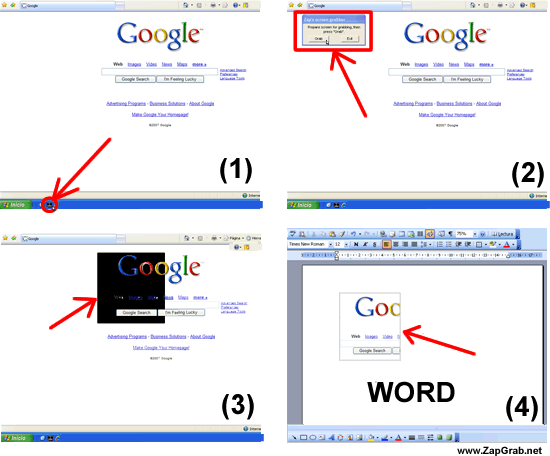
How to capture the screen with ZapGrab You only have to press the button "Grab" (to capture), select the part of the screen you want to capture and … that's it! you have captured part of the screen. |
Winner: Best Screen Grabber
Advertisement
  |
ZapGrab installation 1- Download ZapGrab (30k Zip), save it in C:\
|
|
Screenshots: how to capture screen with ZapGrab
Download the screen capture software ZapGrab
|
|
Video: how to capture screen with ZapGrab (MAC)
Download the screen capture software ZapGrab
|
|


 and put it into the quick launch bar.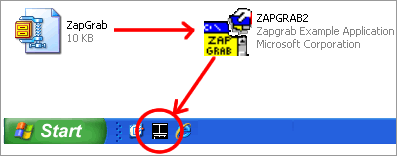


Site Map . Add links . Contact us . Jobs offers . Send ZapGrab to a friend  |
| ZapGrab International: España y Latinoamérica . Deutschland . France . USA & rest of the world |
| © 2022-2001 - ZapGrab - All rights reserved Zapgrab has exclusive rights over said intellectual property, especially with regard to its reproduction, distribution and transformation. Any infringement of the restrictions will be persecuted. For more information see our legal information and copyright.
ZapGrab is an American computer software company dedicated to screen capture. ZapGrab is the world's leading provider of screen capture software for individual and professional use (Windows & Mac). People everywhere use our easy products to capture content from their screens in ways that help them communicate more clearly. For more than one decade, the company's award-winning technologies and software have redefined powerpoint presentations and screen capture. ZapGrab's global reach is continually expanding. With easy screen capture products localized into 3 languages (english, spanish and french) and a distribution network of resellers in more than 30 countries. You can trust in ZapGrab! |
Zapgrab Windows 11 zapgrab windows 10 zapgrab windows 8 desktop screenshots Zapgrab screen capture and image editing Screen capture software for MAC Print screen capture |